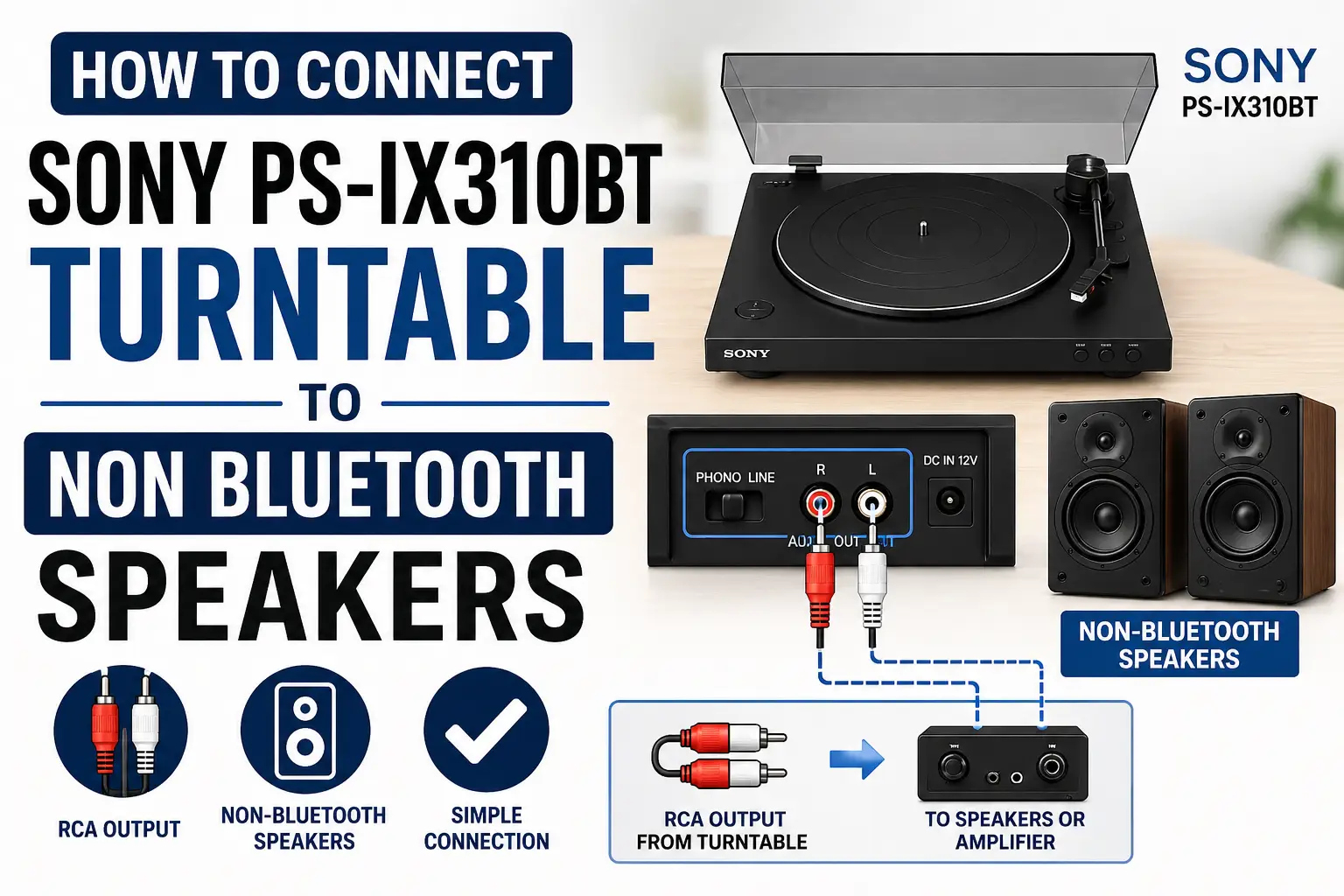
If you own the Sony PS-LX310BT Turntable, you already have a modern record player that supports both wireless and wired listening. But what many people don’t realize is this: you don’t need Bluetooth at all to get great sound. In fact, connecting it to non-Bluetooth speakers using a wired setup is often the smarter move for better audio quality and reliability.
This guide walks you through everything step by step, with practical clarity, no fluff, no confusion.
First: Know What You’re Working With
The PS-LX310BT isn’t just a basic turntable. It has two key features that make wired connections easy:
- Built-in phono preamp (this is crucial)
- RCA (red/white) audio output
The preamp is what allows your turntable to talk directly to standard audio equipment. Without it, the sound would be too weak and thin. Because Sony included it, you can skip extra gear in many setups.
Step 1: Identify Your Speaker Type
Before connecting anything, you need to understand your speakers. This determines your entire setup.
1. Powered (Active) Speakers
These have a built-in amplifier. They plug into electricity directly.
2. Passive Speakers
These do NOT have amplification. They require a separate amplifier or AV receiver.
If you get this step wrong, nothing will work—so don’t skip it.
Method 1: Connecting to Powered Speakers (Simplest Setup)
This is the most straightforward way and works perfectly for most users.
What You’ll Do
-
Find the RCA cable
Your turntable comes with one. It has:- Red (right channel)
- White (left channel)
-
Plug into the turntable
Insert the cables into the RCA output ports on the back. -
Connect to your speakers
Plug the other ends into your speakers’ RCA input. -
Switch to LINE mode
On the back of the turntable, there’s an “Output Select” switch.
Set it to LINE. -
Power everything on
Start your record and adjust volume using the speakers.
Why This Works
The LINE setting activates the built-in preamp, boosting the signal so your speakers can handle it properly. Without this, the sound would be extremely quiet.
Method 2: Connecting to Passive Speakers (With Amplifier)
If your speakers are passive, you need an extra step—but it’s still simple.
Setup Flow
Turntable → Amplifier → Speakers
How to Do It
- Connect RCA cable from turntable to amplifier input
- Connect amplifier to your speakers
- Set turntable to LINE mode
- Use the amplifier to control volume and sound
Pro Insight
Even though the turntable has a preamp, you’re still using the amplifier mainly for power—not signal conversion. This setup gives you more control over tone and volume.
Method 3: Using PHONO Mode (For Better Sound Control)
This is where things get interesting.
The PS-LX310BT lets you bypass its internal preamp using PHONO mode.
When Should You Use This?
- Your amplifier has a PHONO input
- You own a high-quality external phono preamp
- You want cleaner, more customizable sound
How It Works
- Switch output to PHONO
- Connect RCA cable to phono input on your amplifier
- Let the amplifier handle amplification and equalization
Why This Matters
Internal preamps are convenient,but not always the best. External or built-in amp phono stages can deliver:
- Better clarity
- More accurate bass response
- Less noise
This is the setup most audio enthusiasts prefer.
Sound Quality Tip Most People Miss
Here’s something rarely mentioned:
Cable quality and placement matter more than you think.
- Avoid running RCA cables alongside power cables
- Keep them short and untangled
- Use decent shielding if possible
Small improvements here can noticeably reduce hum and interference.
Common Problems (And Quick Fixes)
No Sound at All
- Check if switch is on LINE (for powered speakers)
- Ensure cables are fully plugged in
Very Low Volume
- You’re probably using PHONO mode without a proper preamp
Distorted Sound
- Double preamp issue (LINE mode + PHONO input on amp)
Fix: switch to PHONO or change amp input
Only One Speaker Working
- Loose RCA connection or damaged cable
Why Wired Beats Bluetooth (In Real Use)
Bluetooth sounds convenient,but for turntables, it comes with trade-offs:
- Audio compression reduces detail
- Possible lag between sound and motion
- Signal drops or pairing issues
A wired connection gives you:
- Stable, uninterrupted audio
- Full analog warmth of vinyl
- No latency or compression artifacts
If you care about sound, wired is the way to go.
Final Setup Recommendation
If you want the best balance of simplicity and performance:
- Use powered speakers
- Set turntable to LINE
- Keep cable routing clean
If you want better sound control and future upgrades:
- Use an amplifier + passive speakers
- Experiment with PHONO mode
Final Thoughts
Connecting your Sony PS-LX310BT to non-Bluetooth speakers isn’t a workaround, it’s actually the preferred way for consistent, high-quality audio. Once you understand the difference between LINE and PHONO, and match your setup correctly, everything falls into place.
The key is simple: Match the signal type to your speaker system, and let each component do its job properly.
Do that, and your vinyl setup will sound exactly the way it’s meant to,rich, detailed, and fully immersive.
